

Audience: Retailer/Factory admins
Where: Settings → Data Management → Custom Categories
Applies to: DOS product lines using custom configurators
Custom Category Setup Guide (DOS)
This guide explains how custom categories are organized in the system and how to manage attributes, conditional logic, and style templates. All categories ultimately connect back to four core groups of tables. Other groups derive their data from these, but each group manages its own conditional logic and style templates.
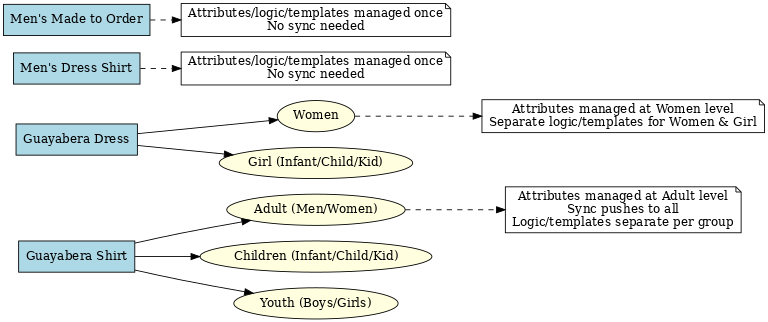
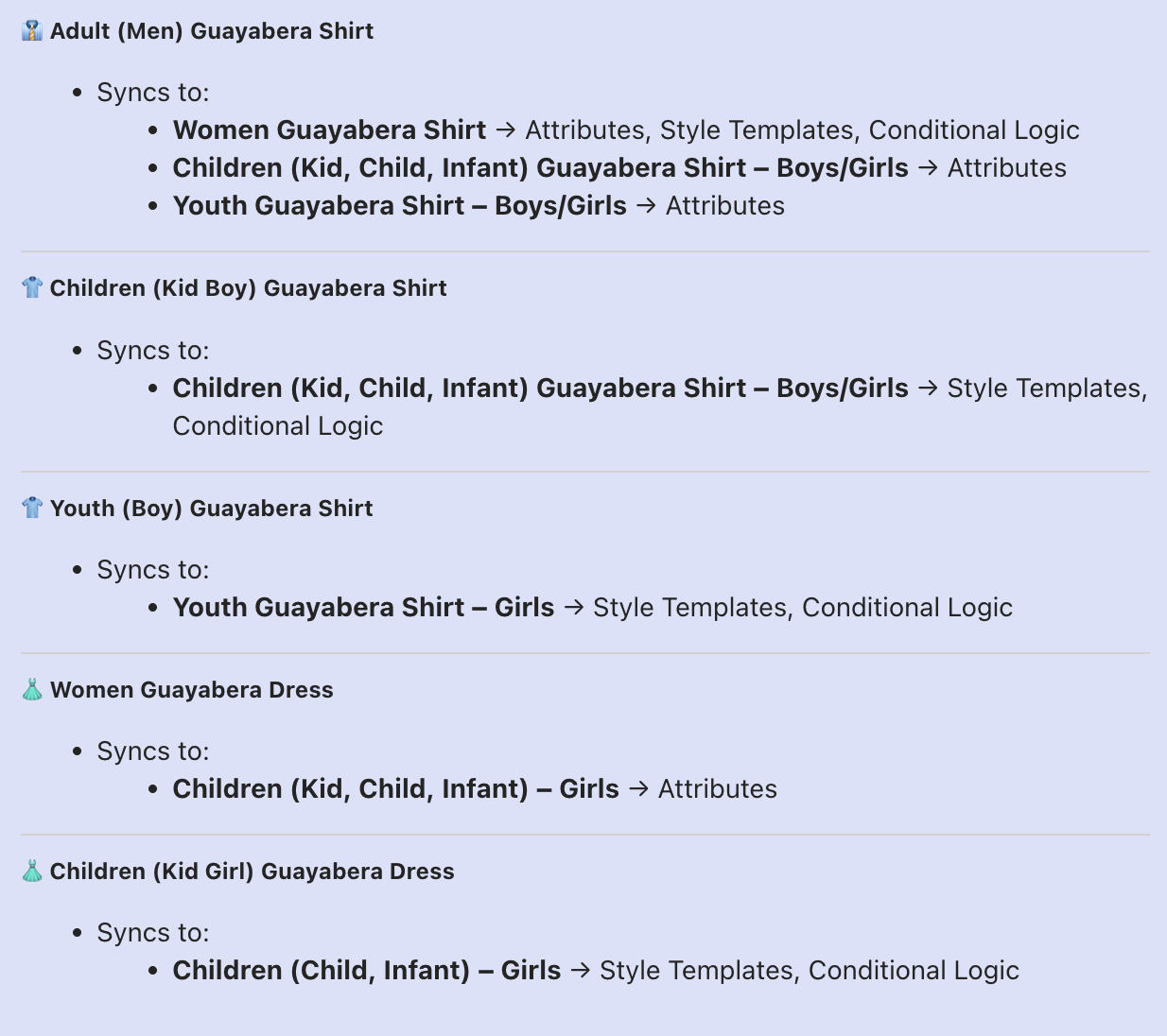
1. Guayabera Shirt
Groups
- Adult Guayabera Shirt (Men/Women)
- Children Guayabera Shirt (Infant/Child/Kid, Boys/Girls)
- Youth Guayabera Shirt (Boys/Girls) — separated from Children to allow different logic and templates.
Attribute Management
- All attributes are controlled from Adult Guayabera Shirt (Men/Women).
- To update attributes for all Guayabera Shirt categories:
- Select Adult Guayabera Shirt (Men/Women)
- Make updates
- Click “Sync/Push Attributes”
Conditional Logic Management
- Logic is maintained once for each group (Adult, Children, Youth).
- Example: update logic under Adult Guayabera Shirt (Men/Women), then click Sync → logic applies to both Men’s and Women’s categories.
- The same applies for Children (sync applies to all non-Youth age groups).
- Youth is independent—its own conditional logic and templates.
Style Template Management
Works exactly the same as conditional logic: maintain once per group, then Sync.
2. Guayabera Dress
Groups
- Women Guayabera Dress
- Girl Guayabera Dress (Infant/Child/Kid, non-Youth only)
Note: Guayabera Dress does not apply to Youth categories.
Attribute Management
- Attributes are controlled from Women Guayabera Dress only.
- Update once and it applies to all.
Conditional Logic & Style Templates
- Separate sets maintained for Women and Girl.
- Follow the same pattern as Guayabera Shirt: update at group level, then Sync.
3. Men’s Dress Shirt
Group
Men
Management
- Attributes, logic, and templates are all managed in this one group.
- Only one set to maintain → no sync needed.
4. Men’s Made to Order Shirt
Group
Men
Management
- Same as Men’s Dress Shirt: attributes, logic, and templates are managed once in this group.
- Only one set to maintain → no sync needed.
Key Takeaways
- 4 Core Groups: Guayabera Shirt, Guayabera Dress, Men’s Dress Shirt, Men’s Made to Order.
- Attributes: Often managed in one master table, then synced.
- Conditional Logic & Templates: Always managed at the group level. Sync applies across sub-categories, except Youth, which is separate.
Change log: 2025-09-09 — Initial DOS guide created with diagram.